

Lutron Caseta Original Smart Dimmer Switch Kit w/ Hub, with Pico Remote, Wallmount Bracket, & Smart Hub, Works with Alexa, Apple Home, Google Home, 3 Way, 150W, No Neutral Req, P-BDG-PKG1W-A
$114.95
Related Products


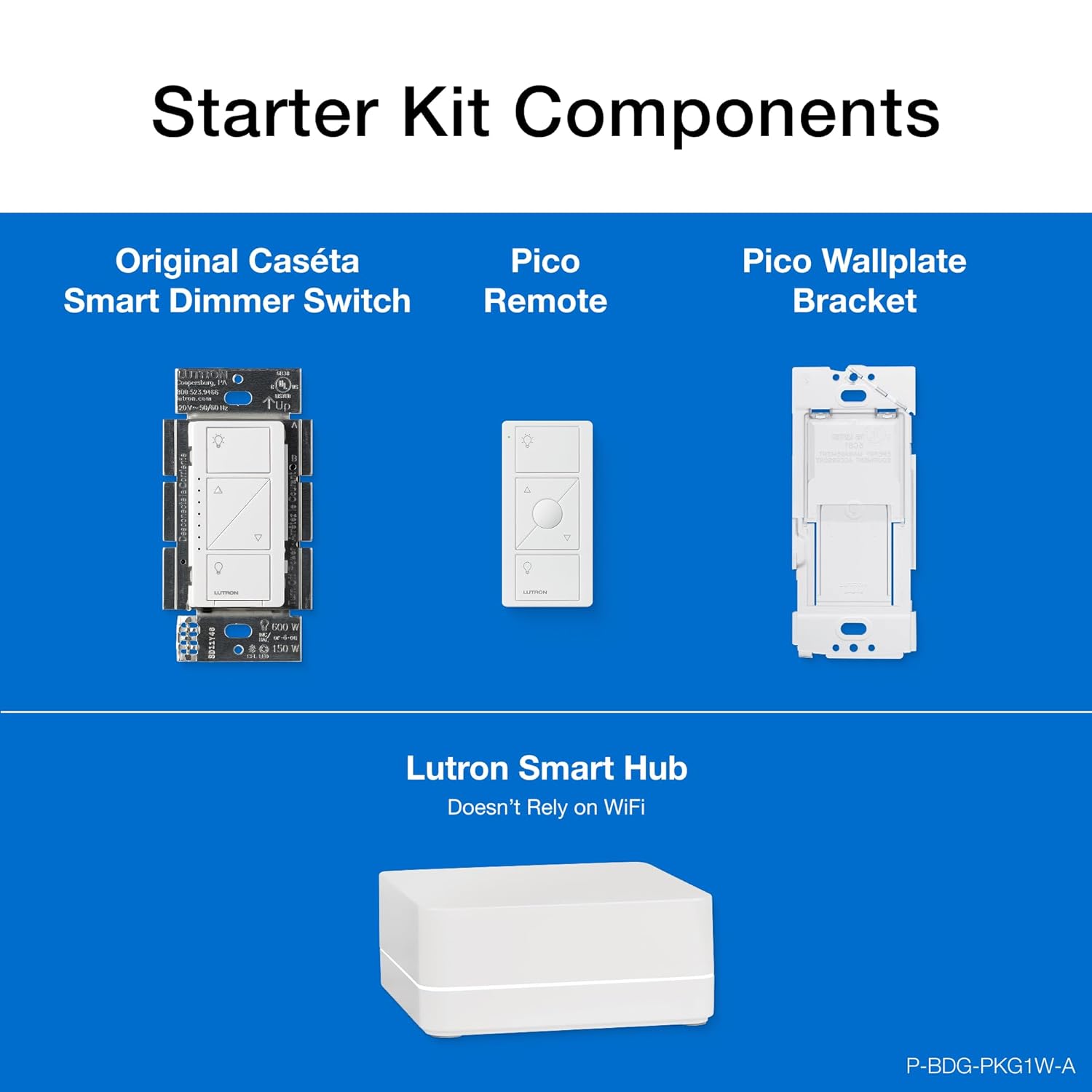
The Caseta by Lutron starter kit with Caseta Smart Hub provides simple and personalized control of your lights, shades and temperature. Control your lights from anywhere within your home with the included Pico remote controls or from anywhere in the world using the free Lutron app. Set lights to automatically adjust with spring and fall time changes, create personalized schedules to turn on, off, or dim lights at set times to best fit your everyday routines, or control lights with your voice via Alexa and Siri. The Caseta Smart Hub also connects with other leading brands like Ring, Honeywell, Sonos, Serena shades and more. The included in-wall dimmer installs easily with no neutral wire required, providing the best dimming performance for over 500 different dimmable LED bulbs, and can be controlled from anywhere within the home with the included Pico remotes. To use dimmers in a multi-location application, replace the existing switch with the included Pico remote control and wall plate adapter. Pico remote control takes (1) CR2032 battery, included in remote.
MOST CONNECTED SMART LIGHTING: Add your lights to Amazon Alexa, Apple Home, Google Home, Ring, Sonos, Samsung with the Caseta Smart Hub; Lutron Caseta Dimmer Switch connects with more smart home devices than any other smart lighting control brand
REMOTE CONTROL LIGHTS: Use the included Pico Remote to wirelessly control up to 10 Caseta devices, like a Lutron dimmer switch, without needing a smart hub; works up to 30 feet through walls, 60 feet line of sight, with a 10 year battery life
MAKE YOUR LIGHTS SMART : One Caseta smart dimmer switch can turn multiple lights or fixtures smart, even existing ones. Save money and keep your bulb styles open by putting smart lighting at the switch
CONTROL WITH THE LUTRON APP: Manage your lights anywhere with the Lutron app; control lighting and advanced smart features such as scenes, scheduling, geofencing, smart-away, timers, 3 way smart switch, app control, and more
CASETA ORIGINAL AESTHETIC: The Caseta original dimmer switch boasts functionality with a sleek, modern aesthetic. The original dimmer switch allows you to turn your lights fully on and off, with additional buttons to raise or lower the light level
RELIABLY SMART CONNECTION: The Caseta smart hub works without Wi-Fi, giving your dimmer light switch super-fast, ultra-reliable smart lighting that works without slowing other Wi-Fi devices down
Includes (1) Lutron Caseta Smart Hub (1) Caseta dimmer switch (1) Pico 3-button dimming remote and (1) Pico wall plate bracket; WALLPLATE NOT INCLUDED, sold separately
ANYONE CAN INSTALL: No neutral required; Can easily be installed in as little as 15 minutes. We provide step-by-step walkthroughs, install videos, 24/7 technical support (1-800-LUTRON1) and more to help you every step of the way
ADD A 2ND SWITCH ANYWHERE: Mount the Pico Remote with the wallmount bracket to add a 2nd “switch” anywhere; Remote wirelessly connects to the dimmer; no cutting holes or running wires; Any Caseta smart product can be paired up to 10 Pico remotes
TECHNICAL DETAILS : Works with up to 150W LED and 600W Incandescent / halogen
8 reviews for Lutron Caseta Original Smart Dimmer Switch Kit w/ Hub, with Pico Remote, Wallmount Bracket, & Smart Hub, Works with Alexa, Apple Home, Google Home, 3 Way, 150W, No Neutral Req, P-BDG-PKG1W-A
Add a review
$114.95
Lee527 –
High quality remote dimmer that just works
Lutron was founded by the inventor of the dimmer switch, and has more experience and a broader range of them than anyone else. These are an easy way to replace a regular switch, or add a new switch anywhere without new wiring. An optional hub (included with some kits) expands its capabilities, but it does all the most common functions even without the hub. I’ve tried dimming several brands of LED light bulbs and it’s worked well, dimmed to low levels, and not flickered with all of them. It also works with many home-automation ecosystems (i use Apple Homekit). Highly recommended.
JP –
The “no longer a newbie” take: Lutron’s Hub vs. other Wifi switches
I was once a newbie with Caseta – but no longer, so I hope this helps you. This kit is the first purchase you need for Lutron’s system. Once you have the hub, no more kits are needed for future switch purchases. One hub can manage up to 75 switches (and I think the Hub is included in that count).Some buyers complain about having to wire in Lutron’s hub to your network with an ethernet cable. But you can’t beat the speed and reliability of a wired network connection. Given that Lutron’s product works reliably and is 100% responsive all the time, this is a non-issue for me.Since I put in the first few Casetas, we truly love them and have started to replace switches all over the home. Which brings up another issue… if I had chosen a WiFi connected switches (and I did briefly for use in limited locations, more on that later) I could potentially be adding a much larger number of connected devices onto my network. If your WiFi isn’t all that great to begin with – think entry level routers – this could potentially impact network performance and your connectivity with your switches. For me, that’s just a no go. I really want my WiFi to work well for the things that need to be on it.The PROs of the Lutron Switches:Setting the switches up is straightforward and fast. The setup process works like expected each and every time. I cannot say the same about other non-Lutron WiFi products.Having problems setting them up or is a switch not acting right? Lutron’s support is the bees knees. They have helped me several times and each time they are great.The switches are incredibly responsive both in person and via the app. There are no delays in turning things off and on. The ceiling fan switch is especially a godsend for our old ceiling fan – no more standing on the bed to pull strings or getting up out of bed to adjust things.Lutron and Ring also teamed up and added some camera integrations where movement and/or doorbell pushes can activate lights. It works quite well, but the feature was a little buried in the Lutron app. Big bonus – the integration will also turn off lights after 15 minutes.About the app (and this is a biggie)Purchasing good hardware is one thing, having an app that you only get to experience after you purchase the hardware is downright crazy. But that’s the world that smart switches seem to live in, so here’s the scoop on Lutron – and the apps for a couple other systems I tried.Lutron’s app is well designed and intuitive. You can quickly add new devices, program in schedules and scenes. The app also interfaces with my Lennox thermostat to display the current temp in the home (with the help of Apple’s Home (home kit) app that’s running on a dedicated iPad that never leaves the home). The Ring cam integration is good too.Having tried WeMo and Leviton’s WiFi connected switches, my take on those apps is that they are incredibly clunky. This seems like a misstep, especially when you are going to spend most of your time interfacing with the app than the switch.Since I also use Apple’s Home app with my family, every time a switch gets added into the Lutron hub, it seamlessly shows up in Apple Home. This is of course magically great. Since I didn’t want to add another app into the mix for my wife and family, it’s nice that there have been zero issues with cross platform integration, everything works seamlessly.The Lutron App also has a geofence capability that will turn on/off lights when you arrive and depart from the home. Haven’t used that yet, but it’s cool. Another side benefit, Lutron’s app has an Apple watch app that you can control lights and fans with.The CONS:Edited – The Caseta hub for whatever reason didn’t have auto off timers built in. That said, the addition of their motion sensor product effectively solves this issue.If you have Ring cams, you can turn on the Caseta integration, and a motion or doorbell can turn on lights and after 15 minutes, turn them off again. This works beautifully.Other thoughts:Edited – I used IFTTT (If This Then This) before Ring and Lutron added their cam integration as a trigger to turn on/off lights. IFTTT works, but there was always a bit of a delay to turn on lights if you use it. Plus if you’re internet went down, it didn’t work.Before the Ring integration, I used a couple WeMo switches for my outdoor lighting as they had auto-off timers. But their setup and app was super clunky. Happy to be rid of them.As software support is now kinda important for app driven switches, making sure you get a switch from a company that’s going to be around a while is more important than it used to be. It would be bad if your OS on your phone, requires your apps to get an update and your smart switch maker is MIA.Side note – For the two years I had WeMo switches, changes in Wifi forced me to individually reconnect all switches to it, and it was a horrible process to get them re-paired with WiFi. Lutron has never had this issue, being wired into the network.One switch I purchased from Amazon warehouse (open box) had issues with setup and Lutron’s support was fantastic. They sent a replacement switch so quickly and were really nice about it.Bottom line – stick with Lutron, it works really well.
L. McNerney –
Perfect smart home switch, for a price
I use a few of these around the house, and I plan to expand the use of them. These work great for a smart home setup, and I use the Amazon Echo to control the lights. However, these are not perfect….they are just closer to perfect than any other option I have seen. So I will make a Pro’s and Con’s list, and then explain a bit of why I prefer them over other brands.Pro’s:Easy installReplaces existing switchesWorks with Amazon EchoClean flat appearance (adjustable)Optional remote (I do not use)Works with nearly all light fixture stylesYou only need a single IP addressCon’s:You need a dimmable lightDoes not dim LED the same way it does other lightsExpensiveRequires use of Lutron AppNow, lets start with the install. This is simple, just shut off the power, remove the old switch, and connect this one to the existing ground, positive, and negative (and the pos & neg are not in any specific order!). They even include the screws and plastic wire caps, so it is twist on and screw it in. No tape (although you SHOULD use it!). So since you are replacing the existing light switch you do not need to do anything else, no wire runs and no electrical box install.So now we move to working with Alexa, or the Amazon Echo device. I don’t call mine Alexa, because my daughters name is Alexis. So everytime we talk to her the other her responds….whichever her we were talking to. I use Amazon. But it is nice, just say “amazon turn off the bedroom light” and get a quick “ok” and boom, darkness. It makes us lazy. Or rather, it stops the “It’s your turn to get the light” arguments with my wife, and makes it easier to take care of the baby at 2 am without getting out of bed. But here is the catch, Amazon can only pull the information from the Lutron App. You CANNOT use ONLY Amazon Echo to set it up! You cannot even rename the device. So you are forced to use the Lutron app to set up all the home devices, and name them properly so they are usable with Amazon Echo. Once your entire setup is done you are free to uninstall the app. Although to be fair the Lutron app is pretty good in itself. But this leads to another concern here, if you use the device as part of a smart home you absolutely MUST purchase the Lutron hub….in this case I used Casetta, but since I do not use the PICO remotes I am unlikely to cross the 50 device limit. This is another $150 ish, but it is worth it.Why would a $150 hub for controlling light switches be worth it? Well, if you are like me and are setting up a real smart home, you probably have a lot of other tech stuff in the house. A smart thermostat for example, or maybe even a server or two, a cloud device, and a firewall. For those of us tech geeks who have all of this, but do not want to pay for t-he expensive licenses, we use a free version of whatever we are using. In some cases for the firewalls you are limited on your number of devices. So, if I was going to connect 50 light switches in my house I would use up all of my devices….just to create a smart home. This is not worth it. However, Lutron made it easier, that little hub takes an IP address and that is it. All other switches connect to the hub, not using an IP address that would be counted as a device on the firewall. You have no idea how hard I looked for this particular feature! With all my kids tablets, the computers, phones, servers and cloud….not to mention the other smart home devices….I am already near my limit. This keeps me under it.That covers almost all of the real issues. But the not so real issue that people forget about is that not all lights are made equal, ESPECIALLY with the older filament style bulbs being illegal to produce now. A dimmer on these bulbs worked every time, without any changes needed. But this is not the case anymore, the new light bulbs are required to be dimmable. If they are not you get little flashes in your light bulb while it is off….all….night…..long.Get a dimmable one and this problem goes away, however the LED lights do not dim well. You get off, 75%, 100%. Nothing lower then that….so dimming is not really possible here. However, I got the dimmer because it is cheaper than the regular switch, and who knows….I might find a good bulb that dims properly.
Daniel –
These dimmers seem to work great. I’ve installed about 7 so far with a few types of regressed ceiling lights and wall sconces and they all dim smoothly.Pros:- Smooth on/off dimming. You can press and hold to change the brightness level, or tap, and it has a lot of levels between 0 and 100% so you don’t get that “skipping” effect some dimmers have.- When the dimmer is off, there is a slight green glow to the brightness level indicator on the left side of the switch. It’s very subtle, doesn’t distract and helps you find it in the dark- Works with every type of light I’ve tested so far. “Dim to warm” ceiling and sconces light on and off smoothly over 1-2 seconds and look great.- Allows for wireless “3 way switches”. This saved me a lot of electrical wiring work when I wanted two switches across an empty room to control the same lights. You can stick the wireless one anywhere, program it quickly and make it blend in with other switches.Cons:- This particular pack only has the round center “scene” button on the wireless switch. This may not be an issue to most, but if you press the regular “on” button, lights automatically go to the brightest setting, not to whatever level you had them at last time. The scene button can turn lights on just to 30% or whatever you set it to. If that’s important to you, go buy the version with a scene button on all switches, wired and wireless.
Ray S. –
Bought 1 unit so that my driveway lights can come on at dusk and off at dawn. Extremely easy to install since it’s one of the few units that does not require a neutral a the box. Very easy to pair with the app. Love the fact that after it’s programmed, it does not require Wifi to function. Plan on buying at least another 4. A bit expensive, but it is a Lutron.
Eduardo –
Me encanto, muy fácil de instalar
Amazon カスタマー –
家中にこのスイッチが設置してる。何年も使ってるけどホームアクセサリーの中で最も信頼性が高いアイテムです。
Mabo –
Cada vez le suben más de precio y con la competencia de focos inteligentes en el mercado cada vez menos justificado. Un gran sistema estable y confiable pero caro